The MLOps workflow and CI/CD
Two questions decide whether ML in production can be trusted: what can start a model run, and who said yes to the last one. In Pipewright every run, whatever starts it, goes through one door, the launcher, which applies the environment’s rules. The pipeline’s stages check themselves, a person decides where a decision has consequences, and every step leaves an event. The flow is the same whether a use case trains a custom model, runs on Ray, uses BigQuery ML or runs on Kubeflow on GKE: only the pipeline’s runner differs.
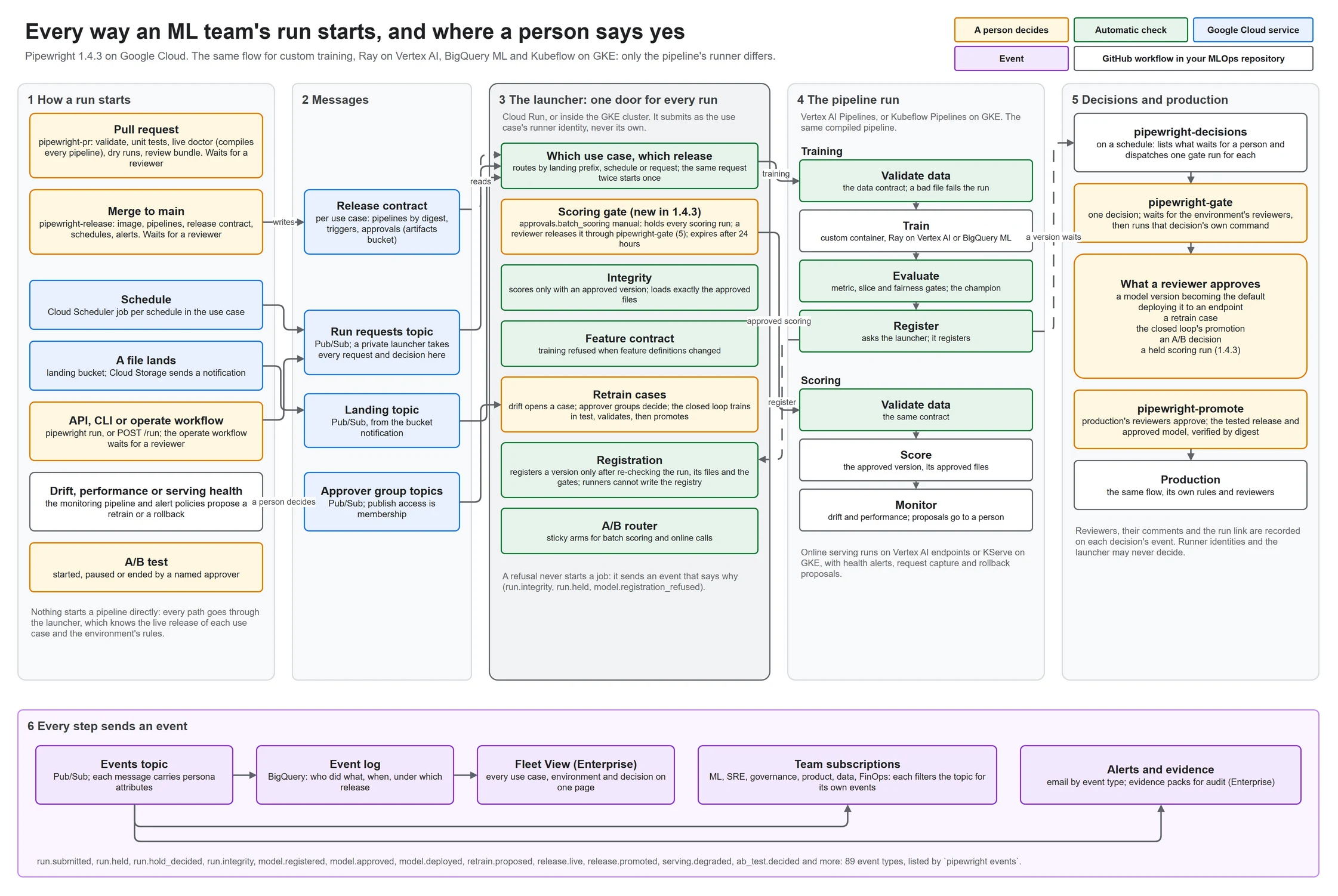
How a run starts
| Trigger | How it reaches the launcher | Who can start it |
|---|---|---|
| A merge to main | pipewright-release writes the release contract, schedules and alerts | the release workflow, after the environment’s reviewers |
| A schedule | Cloud Scheduler (or a CronJob on private GKE) sends a run request | the release that created it |
| A file lands | the landing bucket’s notification over Pub/Sub; the longest matching prefix picks the use case | whoever may write to the tenant’s landing prefix |
| The API or CLI | pipewright run or POST /run; a private launcher takes requests over its run requests topic | operators and CI, as their own identities |
| A signal | drift, performance or serving health opens a retrain case or a rollback proposal | nobody: a person decides the case |
The launcher knows the live release of every use case and the environment’s rules. It submits every run as the team’s runner identity, never as itself or as the person who asked; the same request twice starts once; a refusal is an event that says why.
Stages that check themselves
| Stage | The check | Guide |
|---|---|---|
| Validate data | the data contract; a bad file fails the run | Data and features |
| Train | features as approved (feature contracts); custom container, Ray or BigQuery ML | Pipelines and runs |
| Evaluate | metric, slice and fairness gates; the champion | Evaluation and approvals |
| Register | with policies.registration: launcher, runners cannot write the registry; the launcher checks the run, its files and its gates first | Integrity |
| Score | only with an approved version and its approved files (integrity.inference) | Integrity |
Where a person decides
pipewright decisions pending --env <env> lists everything that waits for a person. The pipewright-decisions workflow runs it on a schedule and dispatches one pipewright-gate run per decision; that run waits for the GitHub environment’s reviewers, then reads the list again and runs the decision’s own command, only if it is still pending. The reviewers, their comment and the run link are recorded on the decision’s event.
| Decision | Listed as | Command it runs |
|---|---|---|
| A version becomes the default | model-approve | pipewright model approve |
Deploy to an endpoint (approvals.deploy_model: ci) | deploy-approve | pipewright deploy-model --approve |
| A retrain drift proposed | retrain-approve | pipewright retrain approve |
| The closed loop’s promotion | loop-approve | pipewright loop advance --approve |
| An A/B decision | ab-decide, ab-conclude | pipewright ab decide, conclude |
| A held scoring run (1.4.3) | score-approve | pipewright scoring approve |
Releases and promotions are gated by the environment the workflow runs in: pipewright-release waits for the target environment’s reviewers, pipewright-promote for production’s.
Scoring runs that wait for a person
With approvals.batch_scoring: manual (or the platform’s policies.batch_scoring: manual) the launcher holds every scoring run, whatever started it, until a reviewer approves it in the gate workflow or with pipewright scoring approve. Use it where scores act on their own, such as letters, prices or credit limits; the cost is a person deciding every run. How it works and what it costs.
The workflows
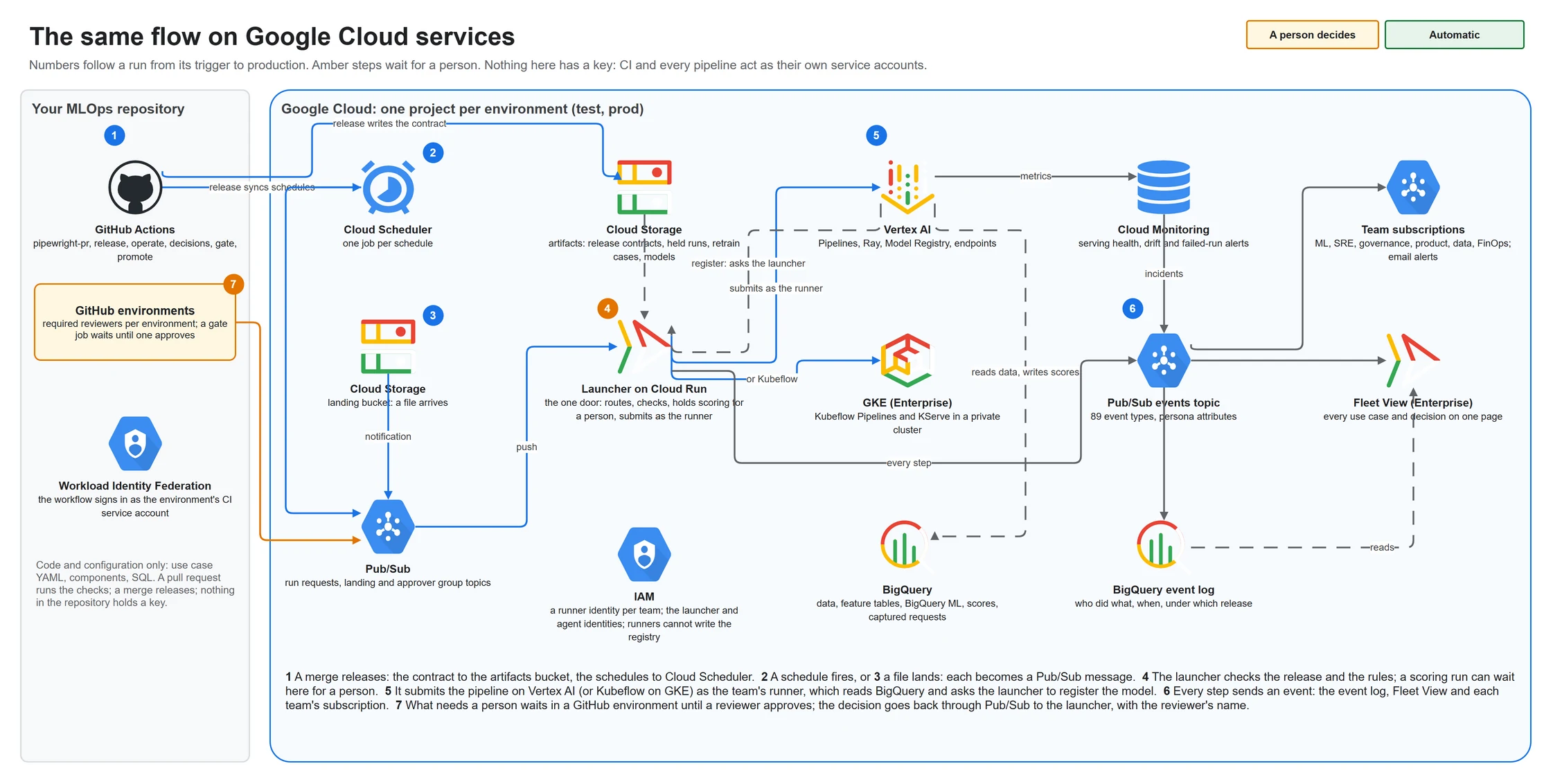
pipewright ci init --environments test,prod writes six workflows into your repository. Every job runs under a GitHub environment named after the Pipewright environment, so its reviewers decide.
| Workflow | When | GitHub environment | Waits for a reviewer |
|---|---|---|---|
pipewright-pr | every pull request | the first environment, or --checks-environment | if that environment has reviewers (see below) |
pipewright-release | on merge | each environment in turn | yes, where it has reviewers |
pipewright-operate | by hand | the one chosen | yes, where it has reviewers |
pipewright-decisions | on a schedule | <env>-decisions | no: it only lists and dispatches |
pipewright-gate | one per decision | <env>, or <env>-<group> for an approver group | yes: that is its job |
pipewright-promote | by hand | production | yes |
Setting up the GitHub environments
- Variables. Each environment needs
GCP_WIF_PROVIDER,PIPEWRIGHT_SERVICE_ACCOUNTandPIPEWRIGHT_PIP_SPEC; the-decisionsenvironments the same as their environment. Sign-in is Workload Identity Federation, so there are no keys. - Reviewers. Add required reviewers to every environment whose changes a person should approve, and turn on “Prevent self-review” where the author must not approve their own change. Required reviewers need a public repository or a paid GitHub plan for private ones.
- Pull request checks. The checks run under the first environment. If it requires a reviewer, every pull request waits for one before its checks start. To keep checks automatic, run
pipewright ci init --environments test,prod --checks-environment test-checksand givetest-checksthe first environment’s variables and no reviewers: the checks still run againsttest, and start at once (1.4.3). - Leave the
-decisionsenvironments without reviewers. The decisions workflow decides nothing; the gate it dispatches does.
The same flow on Google Cloud
What changes from one organisation to the next
The lifecycle stays the same; the wiring around it is yours: how many environments and which promotes into which, the reviewers of each, one identity per team and environment, hosted or self-hosted runners (ci init --runs-on), your branching and release triggers, and steps of your own such as a security scan or a change ticket. A team on another CI system runs the same pipewright commands in the same six jobs.
Related: Releases, promotion and CI, Evaluation and approvals, Events, lineage and reports, Events reference.