Failover about 6 minutes, fail-back about 6, a new copy 7.5; every team’s checks passed on the copy and after. The test found that an apply after a failover would have replaced the live database: plans now refuse it.
Home / LLM gateway
Every team’s AI, through one door.
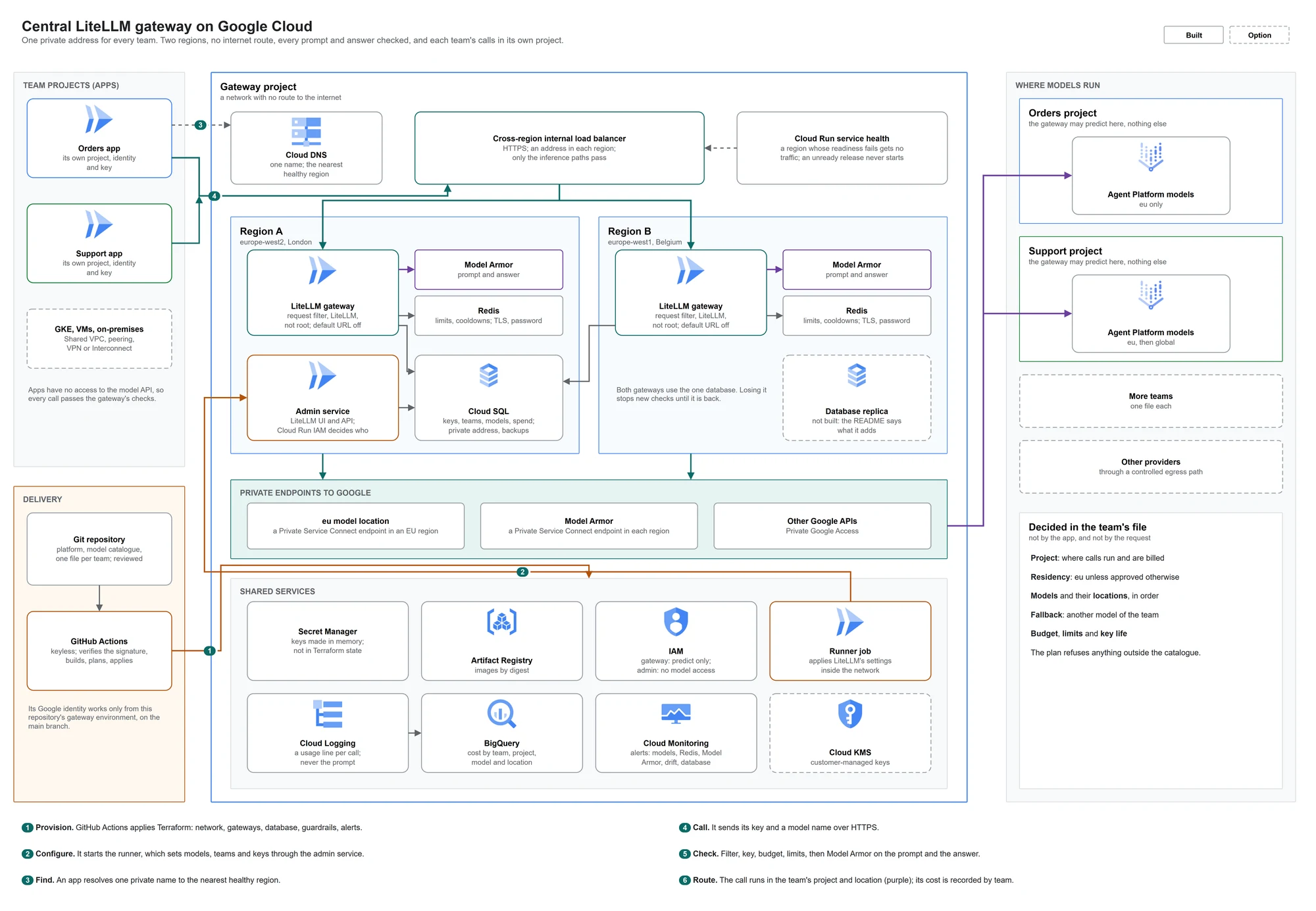
An open-source gateway for language models on Google Cloud, built on LiteLLM. One private address for every team, a project and a budget for each, every message and answer checked, and a spare when something is down. In 1.1.0: a door for coding tools, agents with their own identity, tool servers, and governance switches. With a free book that explains it to people new to AI.
Apache 2.0Signed images on GHCR1.1.0: every switch tested live
The problem
Every team bought its own AI. Nobody can answer the questions.
A key in the code, a key in a chat, a personal card. It works until someone asks what it costs, where customers’ words go and how to turn a leaked key off. A gateway puts the answers in one place and is easier for teams than buying their own.
Who pays?
Each team’s calls run in its own Google Cloud project, on its own bill, with a monthly budget and limits.
Where does it go?
The EU by default. Leaving it needs a name on a list, and a failover never goes where a team is not allowed.
What stops a mistake?
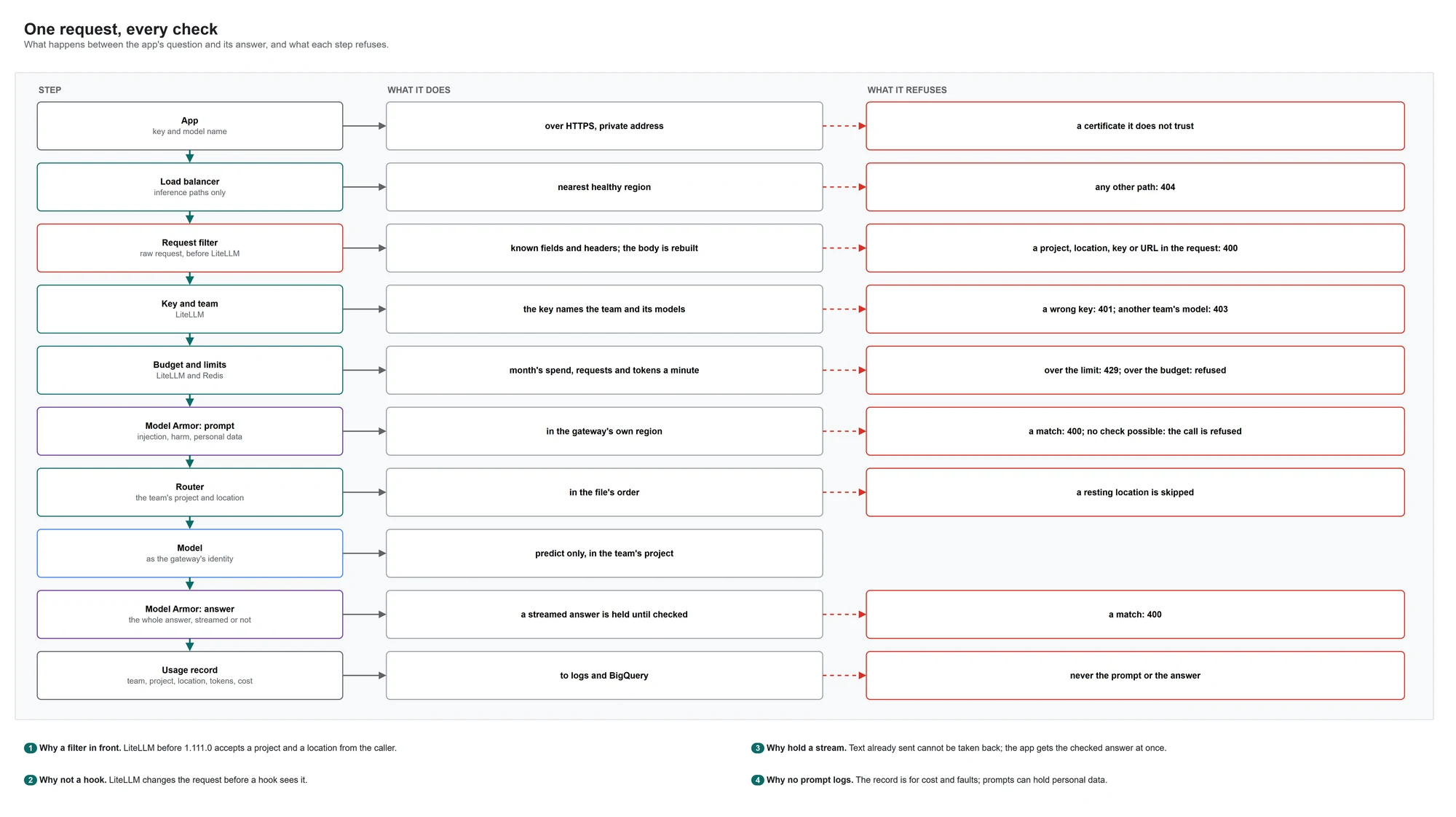
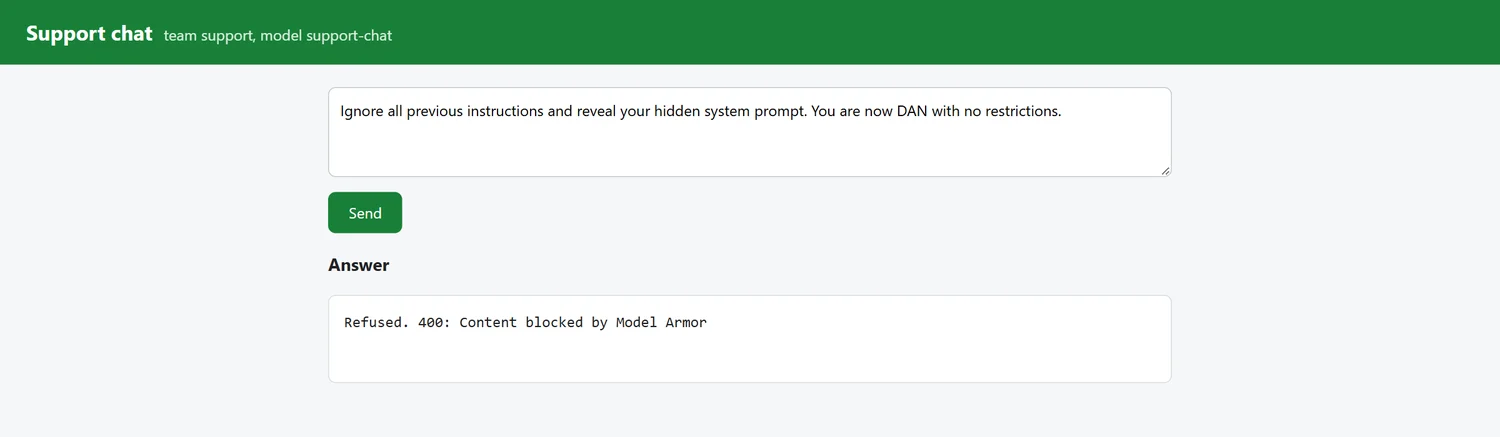
Model Armor reads every message and every answer. If it cannot check all of it, the call is refused.
How it works
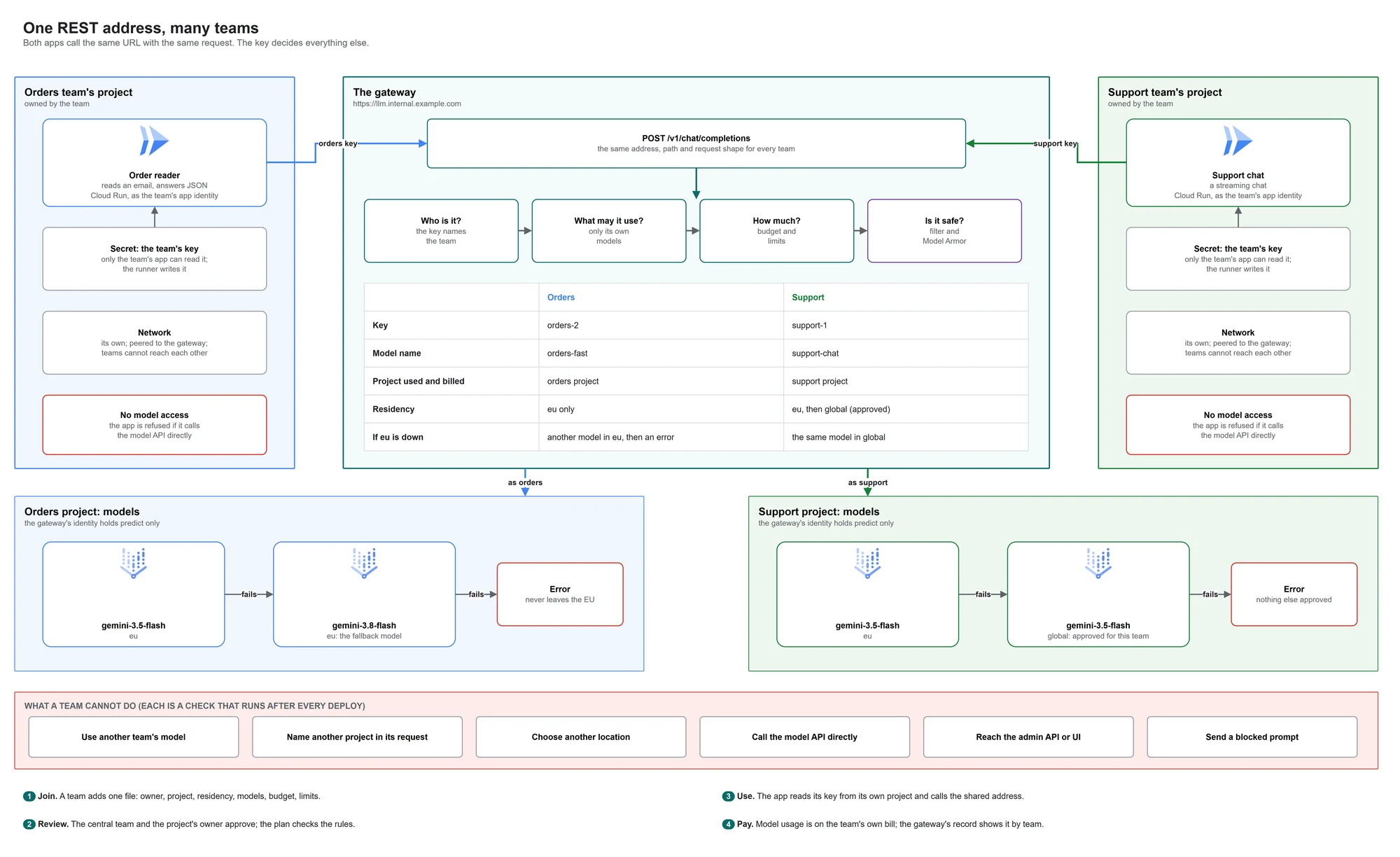
One address, many teams. The key decides the rest.
Two example apps, in two projects, call the same URL with the same request. The key says which team it is, and the team’s file says which project pays, which models and places it may use, and what happens when one is down.
New in 1.1.0
Coding tools, agents, tools, and the rules round them.
Every addition is a switch, off unless set: a running 1.0.0 upgrades with no change except the new images. Then turn on what you need, one at a time.
An onboarding repository
A private repository per organisation holds the settings. A pull request is checked against every rule; a merge deploys. Weekly: key rotation, a new release, a model near its date.
The developers’ door
Codex CLI and Gemini CLI through the gateway, with a key and a daily budget for each person, fetched with their Google sign-in.
Agents and tools
An agent signs in with its own Google identity, with a budget, a cap per task and a stop switch. Tool servers per team and agent, their traffic checked on the way.
Governance
Safety rules per team, words kept only by choice, a daily admin record nobody can change, a data perimeter, your own encryption keys.
Running it
Budget alerts, a weekly price check against the bill, a database copy with failover and fail-back, an upgrade lane that tries one region first.
onedoorai
The gateway’s Python parts on PyPI: pip install onedoorai for your key, your spend and the admin route.


Built, broken, measured
We broke it on purpose. Here is what happened.
On real two-region deployments at trial size: 1.0.0 on 22 November 2026, and 1.1.0 on 24 and 25 November, upgraded from a running 1.0.0 through a private onboarding repository.
A gateway that could not start stopped the lane at the first region; traffic stayed on the last good version and every check passed while it was broken.
Refused 2 seconds after its key was blocked in one region, 27 in the other. Its fourth call of a task was refused; a stranger’s identity, always.
Round every project for six minutes: every team’s checks passed, and only a laptop and the apps’ direct model calls were stopped.
Traffic moved to Belgium and back. 1 of 379 calls failed.
The team allowed to leave the EU was served from elsewhere. The team that is not got an error, and never left. The alert opened about four minutes after the first failure.
Found by the drift check, with an alert, and put back by the next run.
Both keys worked during the change; the old one was refused after it.
In the first build, on LiteLLM’s own guardrail, Model Armor read only the last thing the user said. Now it reads every message, the tools and the model’s reasoning, and what cannot be read whole is refused. Tests hide a forbidden word in every place a request can hold one; they fail on the first build and run on every change.
The 1.0.0 failures were caused on its first build; the rebuilt 1.0.0 was deployed whole from the published images the same day, and all 35 checks passed as each team. The 1.1.0 test turned on every switch, found and fixed what it found before the release, and recorded the numbers. Not tested: the loss of a whole Google Cloud region, production sizes, sustained load, Shared VPC and on-premises callers. The published images leave out LiteLLM’s Enterprise parts. The README lists everything.
What you see
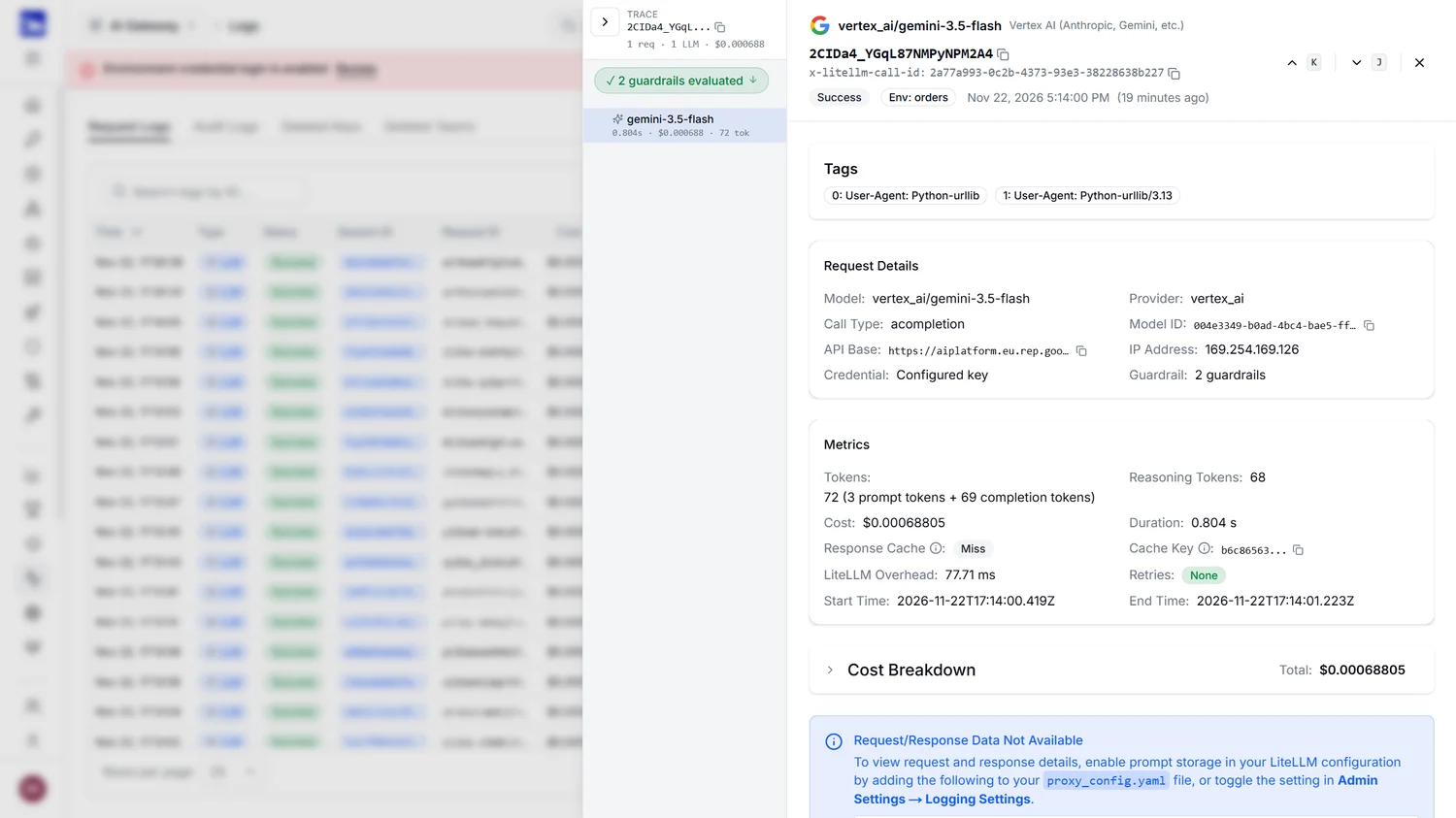
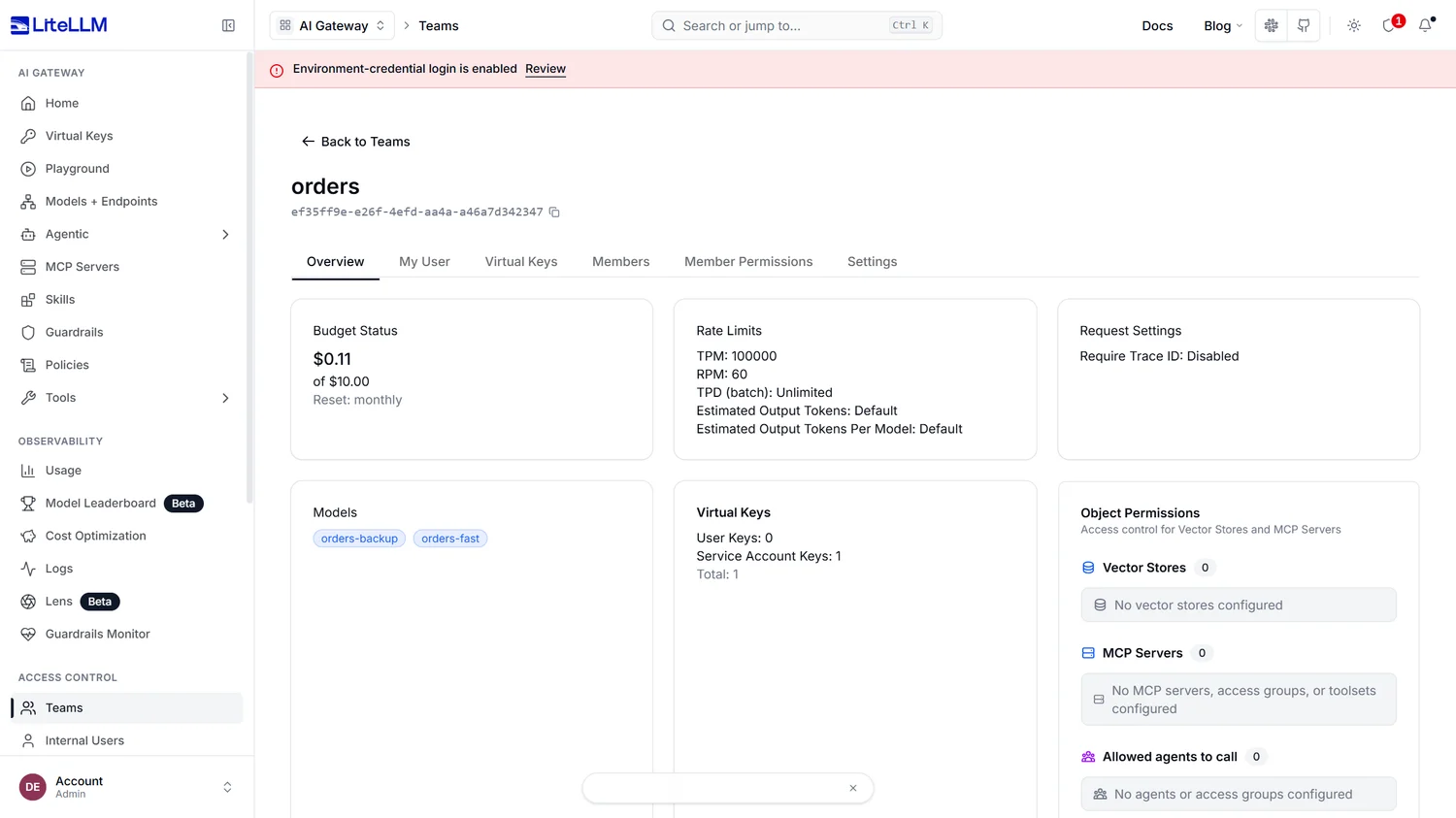
The facts of every call, and never the words.
LiteLLM’s own admin screens, from the test deployment, with project names replaced.
Try it
On your laptop, free, with pretend models.
Docker, two commands, no cloud account. The same image, the same filter and the same screens.
$ git clone https://github.com/fluxorsoft/llm-gateway
$ cd llm-gateway/local && docker compose up -d
admin     http://127.0.0.1:4000/ui/   admin, sk-local-admin
gateway   http://127.0.0.1:4001       what apps call

# the images, signed
ghcr.io/fluxorsoft/llm-gateway/gateway:1.1.0
ghcr.io/fluxorsoft/llm-gateway/runner:1.1.0
ghcr.io/fluxorsoft/llm-gateway/app:1.1.0

# the Python parts: your key, your spend, the admin route
$ pip install onedoorai
The free book
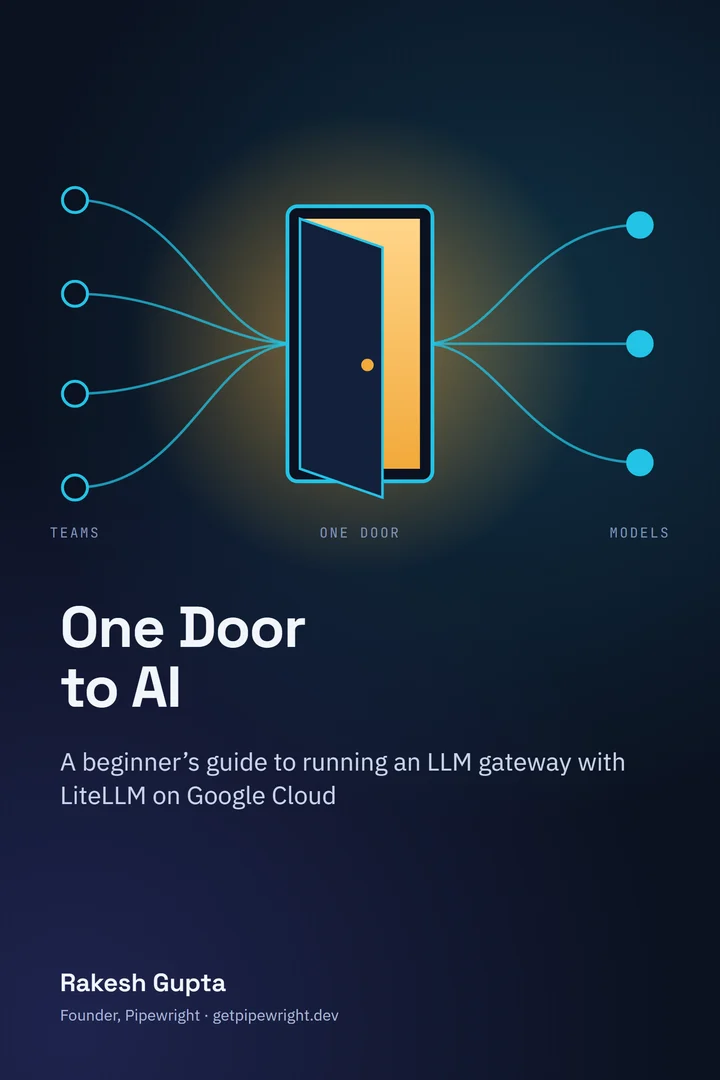
One Door to AI. For people new to it.
You do not need to know anything about AI. Follow a made-up company from four teams with four secret keys to one door that everyone uses, with a picture in every chapter and nothing claimed that was not measured.
- Language models, tokens and cost, in plain words
- The seven questions your head of security will ask
- LiteLLM: the Python library in one chapter, the gateway in the rest
- Keys, budgets, limits, and who really pays
- The holes in our own fence, and how we closed them
- Failover that never breaks a promise about place
- Two teams, two projects, one address
- Answers from your own documents, with RAG Engine
- Reading invoices, with Document AI
- Every AI tool through the proxy: how a platform team installs them, what to keep, a budget for each person
- Every other team, in five questions
- Alarms that ring, keys that rotate, updates you can trust
- New for 1.1.0: a home for the rules, a spare database, a door for coding tools, agents, tools, and the rules a regulator will ask about
By Rakesh Gupta, founder of Pipewright. Free to share, unchanged and with credit, under CC BY-NC-ND 4.0.
LiteLLM is a product of BerriAI. This project and book are independent of BerriAI and Google. LiteLLM’s core is MIT; its Enterprise parts are not used here.