Machine learning on Google Cloud, released like software.
Describe a model in YAML. Pipewright releases it, runs it, judges it against the model it would replace and asks a person before it goes live, with every step on the record.
data: contract: { min_rows: 500, unique: [customer_id] } label: { column: churned, positive: 1 }evaluation: gates: [{ metric: auc, min: 0.75 }] champion: { enabled: true } # beat what serves nowapprovals: { promote_model: manual } # a person decidesmonitoring: drift: { method: psi, threshold: 0.2 } # then ask people
Most models never reach production. The ones that do drift away.
Not because the models are wrong. Because every team rebuilds the same plumbing, a run is not a release, settings hide in notebooks, and nobody can say later why a model was trusted. Pipewright closes those gaps once, the same way for every use case.
Rebuilt plumbing
Every team writes its own triggers, deployment scripts and identities.
One shared launcher per environment starts every team's runs, as each team's own identity.
Runs are not releases
"Which code trained this model?" has no reliable answer.
pipewright release pins images and pipelines by digest in a write-once contract. Rollback is one command.
Settings in code
Thresholds, features and gates live in notebook cells nobody reviews.
Data contract, features, gates and monitoring in YAML, checked against schemas and each other before anything runs.
Teams blocking each other
ML teams wait on tickets for buckets, datasets and service accounts.
The platform team publishes one manifest per environment. Use cases refer to names, never create infrastructure.
Blind retraining
A cron job retrains on drifted data and ships whatever comes out.
Drift opens a decision case with the facts. Named approvers decide; nothing trains until they agree.
Governance after the fact
Before an audit, someone reconstructs the story from tickets and memory.
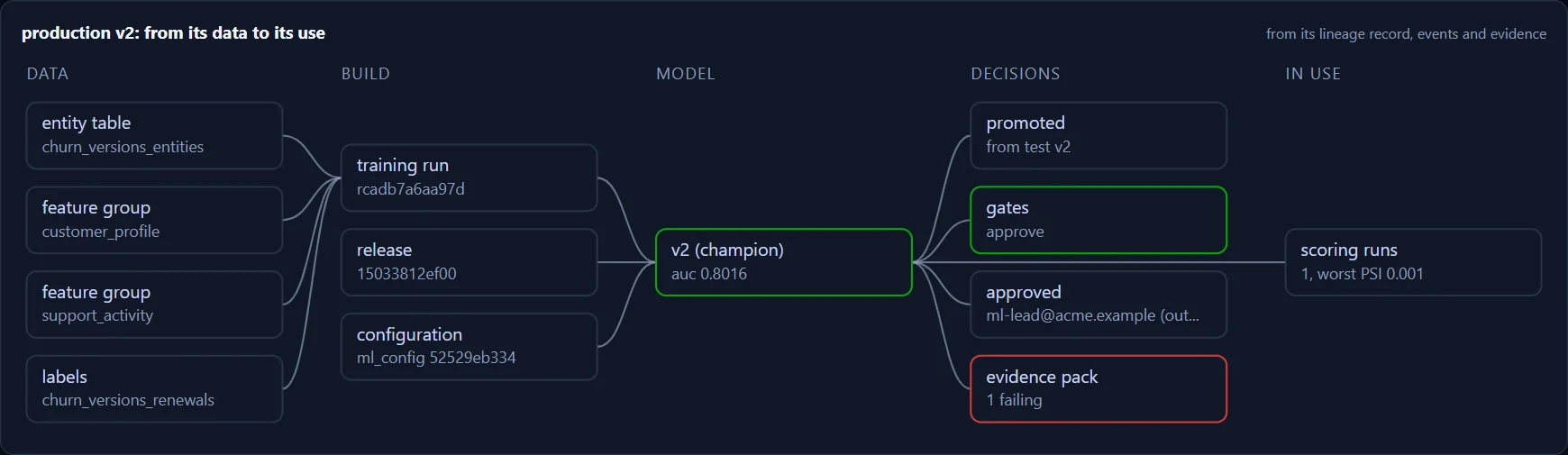
Every release, run, approval and deployment is an event with who did it. pipewright lineage reads it back.
Four commands from YAML to a model a person signed off.
Your pipeline code stays plain Kubeflow Pipelines. Pipewright supplies the rest: the release, the run, the gates, the decision and the record.
$ pipewright new-usecase --name churn --tenant retention --owner team-retention
created usecases/churn from the churn example

usecases/churn/
  usecase.yaml            what it is, who owns it, how it is served
  config/data.yaml        contract, label, split, features
  config/evaluation.yaml  gates, champion, slices, fairness
  config/operations.yaml  monitoring, alerts, retraining
  training_pipeline.py    plain Kubeflow Pipelines v2
  components/             your code, your libraries

$ pipewright validate --env dev
ok: schemas, references and cross-checks, offline
Editors suggest and explain every key; pipewright explain data.split.strategy prints any key's meaning, type and default.
$ pipewright release --env test
tables     lapse_risk_scores: up to date
images     components sha256:e4e27f97… pushed
templates  training, inference compiled and pushed by digest
contract   releases/9f3c2e1.json written once
verified: contract is valid, templates match
live: churn -> 9f3c2e1

$ pipewright rollback --env test --usecase churn
live: churn -> 51ab07d   # nothing rebuilt
A release is named after its commit. Repeat it and nothing changes; change the code, the configuration or a default and it is a new release.
# a file lands in incoming/retention/: the launcher starts the training run
churn-r9f3c2e1-7b2   SUCCEEDED   ingest · validate · train · evaluate · register

$ pipewright model list --env test --usecase churn
churn-classifier (test)
  v7  candidate  run r9f3c2e1  auc=0.8124  [gates pass]
  v6  DEFAULT    run r51ab07d  auc=0.8003  [gates pass]

$ pipewright model approve --env test --usecase churn --version 7
recomputed: gates and champion margin from v7's record
v7 is the champion
Pipewright recomputes every gate from the version's evaluation record before it approves or serves it; a rewritten step that drops a gate cannot promote a failing model.
Case rc-20261007-c3d3ac: churn (prod), drift
Drifted   tenure_months 3.035, monthly_charges 0.853
Data      checks passed on the latest batches
Champion  v6, trained 2026-10-06
Approvers ml-leads (done), model-risk

$ pipewright retrain approve --env prod --usecase churn \
    --reason "real shift after the price change"
recorded: approved by model-risk, with the reason
training submitted in test; production only serves
Snoozes and declines expire, cases re-open when things get worse, and the requester can never approve their own case.
Everyone does their own job. Nobody does someone else’s.
Clear ownership is the design: the platform team owns the cloud, ML teams own their models, approvers decide, auditors read the record.
ML engineers
Write the model your way; describe its data, gates and monitoring in YAML; release it in one command.
Your day with Pipewright →SQL teams
Segments, forecasts and classifiers in BigQuery ML: YAML and SQL, no Python, the same gates and approvals.
Models in SQL →Platform teams
Build each environment once, publish its manifest, set the policies. Teams join by name, with their own identity and data.
What you hand over →Approvers and auditors
Decide from a short decision pack, under your own name. Read the record of any model, from its data to its use.
The record →Everything a model needs between a notebook and a decision.
The Pipewright core is free under Apache-2.0. These are not demos: each one is built and tested end to end on live Google Cloud environments before it ships.
Write-once releases, promotion by digest
A release pins the component image and every pipeline template by digest. pipewright promote carries the tested release and the approved model to production; nothing is rebuilt, and anything that differs is turned back.
A person in every decision that matters
Drift opens a case, not a retrain. Training starts when every required group has approved.
Features, point in time
From feature tables or Feature Store groups, as of each row’s cut-off. Nothing from the future reaches training.
BigQuery ML, governed
Classification, segments, PCA, forecasts and imported models, with the same gates and approvals.
Endpoints, canaries and online features
Deploy an approved version with a canary. Callers send a customer ID; the endpoint reads the latest features from the online store, from the training definitions.
Ray, GPUs and synthetic data
A Ray cluster per step, made and removed for you; GPUs within the platform’s limits; synthetic data learned and gated inside your environment.
Google’s managed services, or your own GKE cluster.
The same use case file and the same release run on either. The platform team picks per environment; ML teams change nothing.
Agent Platform
Google runs the machines. The simplest path, and where most teams start.
Private GKE
Your cluster, your node pools, inside your perimeter. For teams that already run Kubernetes.
One line in the environment’s manifest decides: orchestrator: kfp. Everything outside the cluster, from BigQuery to Model Registry, is the same.
Private by default. Evidence for every model.
For organisations that answer to a regulator, a risk committee or a security team: the core, plus a private environment blueprint, write-once evidence packs, governed synthetic data releases, and Fleet View across every environment. With support from the people who built it.
- Private-managed blueprint: CMEK, VPC Service Controls, no public endpoints
- Evidence packs: fifteen controls per model, hashed and kept write-once
- Fleet View: every model in every environment, with its lineage
- AI build assistance: coding agents that build use cases and never see a row, with the proof (1.3.0)
Start in an afternoon. Keep it for years.
The starter Terraform builds a working environment in one project. Install the CLI, copy the churn example, and your first model is released, trained and judged the same day.
# 1. an environment (the starter, in your project)
$ git clone https://github.com/fluxorsoft/pipewright-starter
$ terraform apply env.tfplan

# 2. the CLI
$ pip install "pipewright-mlops[gcp]==1.3.0"

# 3. a use case, checked, released and run
$ pipewright new-usecase --name churn --tenant retail --owner me
$ pipewright validate --env dev && pipewright doctor --env dev
$ pipewright tables sync --env dev
$ pipewright release --env dev
live: churn -> 3d1f0aa
$ pipewright run --env dev --usecase churn --source-uri gs://…
$ pipewright model list --env dev --usecase churn
  v1  DEFAULT  auc=0.8124  [gates pass]
Learn it by doing it. Six tutorials, one use case each.
Each tutorial takes one model one step further on a real environment, and says what it costs to leave running. Start with the quickstart; read the concepts when you want the why.
Put your next model on a governed path.
Free and open source, in your own Google Cloud. Enterprise when you need private networking, evidence and support.